Quick introduction guide to the new features
Web usage guide

New functionalities
ADD USERS TO YOUR ACCOUNT
Yes you need it, you can add more users to your customer account. This allows other members of your team to also access the website, browse the catalog, and place orders independently.
To add new users, you just need to provide the corresponding email addresses to your reference sales representative, who will take care of activating them.
This option is especially useful Yes you work with multiple purchasing managers, stores, or departments, as it allows you to centralize management in a single account but with differentiated access for each person.
NEW CART
Thanks to being able to associate new users to the same account, we have implemented two types of carts:
- Collaborative cart, where all users can add products to a shared basket
- Personal cart, associated with each user, where each one has their own basket.
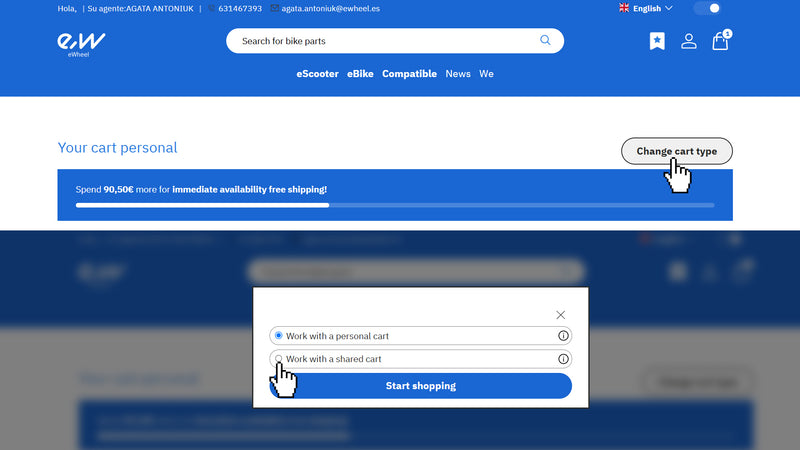
This structure provides greater control, organization, and agility to the purchasing process, allowing each company to adapt the use of the platform according to its internal dynamics. For example, you can use the collaborative cart for large monthly or weekly purchases and the personal one for urgent products. You can switch at any time from one type of cart to another from the cart itself, as shown in the image below.
SHIPPING ADDRESSES
When placing your order, you can freely choose the shipping address you desire. However, in your account, the usual addresses are managed as branches, and to edit these, you will need to request it from your sales representative.
When you access the website, the first thing you will be asked is for which branch (address) you are going to make the purchase. This allows that, Yes you have several stores or delivery points, you can make all your orders from a single account, quickly and organized.
RETAIL PRICES
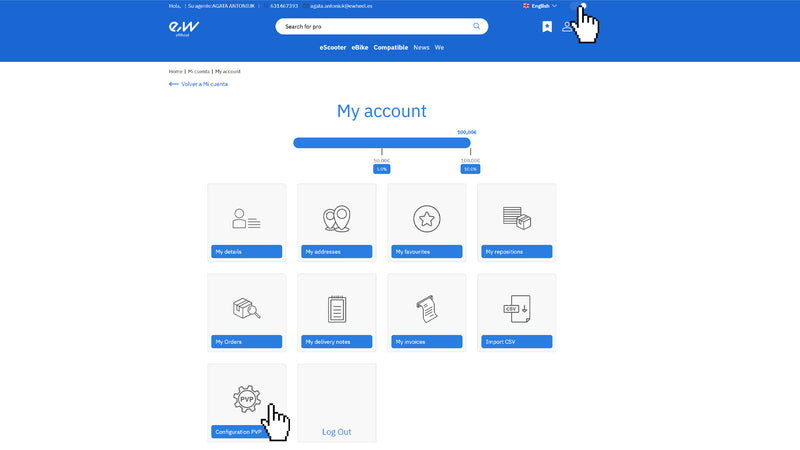
In the "My Account" section, you have the "Configuration PVP" section where you can choose Yes to display or not the retail price.
On the top right, you have a button with which you can hide the price at any time at which you purchase our products. This aims to show products directly from our website to your clients without them seeing the distributor price.
PURCHASE EXPERIENCE
MENU
Ewheel is a company specialized in Scooters electrical, but over time we have introduced products related to e-bikes in our catalog. To facilitate navigation, we have added in our menu the separation between both categories.
The menu also includes the section Compatible, where you have the main models of Scooters organized by brand. Clicking on each model will take you to all the Compatible products with that model.
SEARCH BAR
- Yes you perform a generic search, the search will show you only 10 results, to see all possible results you can click on “See all search results”.
- Yes you search by reference (EAN or SKU) your result will be the first on the left.
FILTERS
We have updated all the information on our products, and that represents a big step in segmenting and searching for technical and specific products. It will be possible to filter by characteristics such as the diameter of a Tire, both in mm and in, for example, in the case of controllers filtering by nominal power and amperes; and so with all the specific characteristics of each of the products.
GROUPED PRODUCTS
The option of grouped products has been introduced, meaning products that only vary in one or two characteristics have been able to be grouped, as is the case, for example, with helmets, which have been grouped by size and color.
You can see the groupings without needing to enter the product itself, the different variations will appear just below the product, with a dropdown depending on the number of variants they have.
When making the purchase of these, we can see below the specifications of each product a Board where we can set the quantity of the product we want and add it to the cart as if Yes were a non-grouped product.
PURCHASE COMPLETION
At the time of completing the purchase process, it is very simple, we go to the cart and there we will see the selected products, where we can modify the quantities requested of the ordered items and also remove the products.
At all times we will see what type of cart we are in, both personal and shared, and change the type depending on which purchase we want to complete.
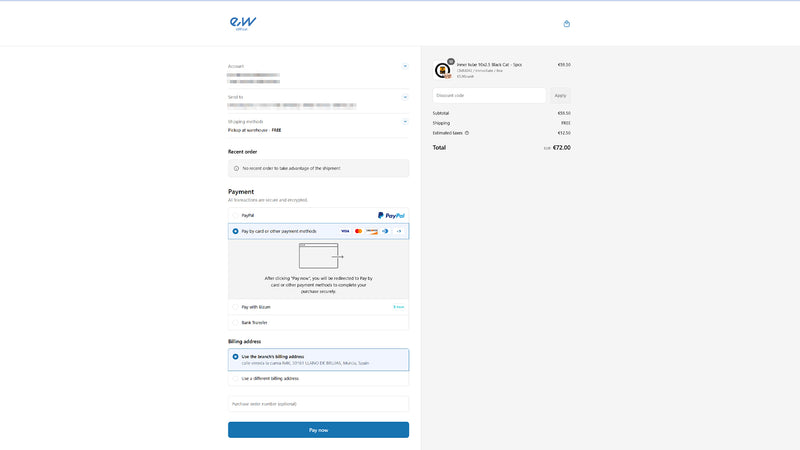
When selecting to pay, it takes us to the payment page where we see on the left the account from which we are buying, the shipping address, the methods, and to select how we want to make the payment and fill in the data; and on the right the items we are going to buy, the respective amounts, shipping, taxes, and the total to pay. In this part, you can enter a discount or promotional coupon, if you have one.
Once all the information is filled in, proceed to payment by clicking pay now.